WinRAR 5.4去广告
WinRAR5.40注册后仍然会弹广告,即使关于里已经显示已注册也没有用。
以前的注册文件已经没用了,中文简体版都给国内代理公司了,所以即使是注册版,一样会有广告。
rarlab开始考虑转变商业模式了,他们默许了这种弹窗广告的操蛋模式。有注册用户表示了不满,以下是官方的答复。
Thank you very much for using WinRAR. We apologize for the inconvenience you are facing with WinRAR. The advertisement within WinRAR is part of our business model to allow the continuous development of WinRAR. We always work on providing you with the best compression software in the market.
Since you are a registered user of WinRAR, please install on of these versions (depending on your hardware configuration) to use WinRAR without any advertisement. Once your key is recognized by the software, you won’t see any advertisement anymore.
不过最终他们还是给出了一份不包含强制弹广告的下载链接,需要导入以前的有效注册key文件后就不会弹广告。
WinRAR 5.40 Simplified Chinese 32-bit version:
http://www.win-rar.com/fileadmin/winrar-versions/sc20160819/wrr/wrar540sc.exe
备用链接
WinRAR 5.40 Simplified Chinese 64-bit version:
http://www.win-rar.com/fileadmin/winrar-versions/sc20160819/wrr/winrar-x64-540sc.exe
备用链接
通过以下几种方法,可以避免广告:
1、使用上面的链接下载安装WinRAR并注册。
2、使用Winrar 英文版和繁体中文版。
3、使用5.31中文版,这个是最后一个没有广告的版本。
4、通过ResHacker软件去除广告。
下面是使用ResHacker去广告的步骤:
使用ResHacker打开WinRAR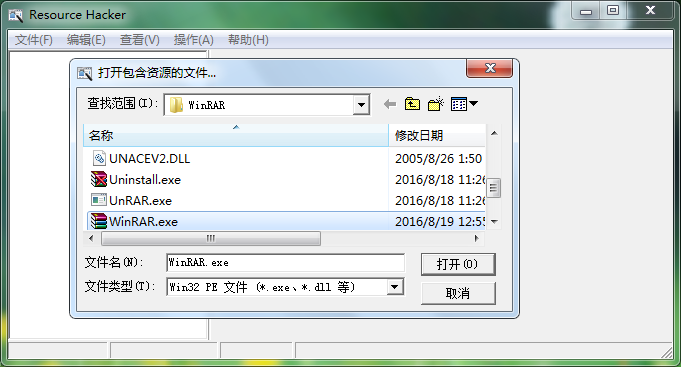
定位到 字符串80段,删除其下1272关于中国代理信息的键值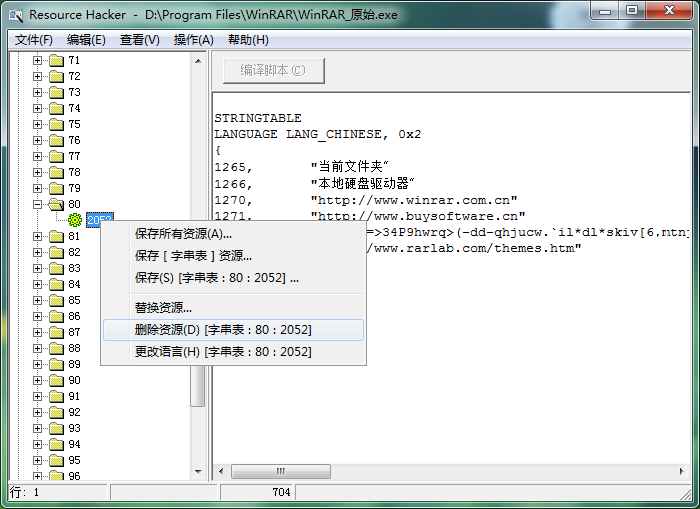
保存文件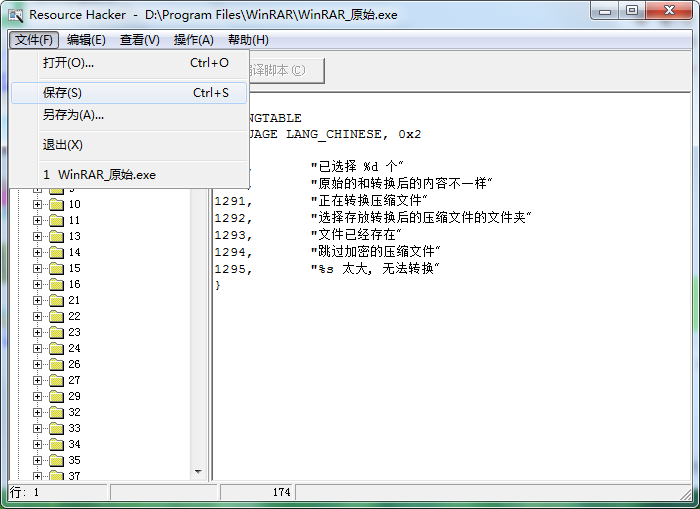
WinRAR注册方法:
1、下载key文件
2、复制到WinRAR安装目录即可
